

















































Collate meaning printer prints documents in sequence and keeps every copy in page order. It speeds up the process of printing documents like formal letters, notebooks and magazines. Most printers use automated collation and provide ready-to-use printed documents. You can also use collated and uncollated printing options on your office and home printers.
In this blog, we are providing top-notch collating printing techniques. You will get a comprehensive guide to collated printing, collate vs. uncollated, collate print settings and functions of collated printing. If you are confused about uncollated and group printing, our article can help.
What Is Collate Printing?
Collate printing is the process of printing that can set the sheets through an already installed printer’s software “automated collation” and print them in the right order. For instance, you are printing 5 copies of your documents. The collating process will arrange the sheet numbers and then start printing like set 1, set 2, set 3, set 4 and set 5. It will not print 5 copies of each page.
Collate And Staple
What is collating? Collating means printing long or short documents in complete sets. On the other hand, the term staple means the process of binding these printed copies of any document in sequence. Both terms are related to the printing process, but they work differently.
What Does Collate Mean On Printer?
What does collate mean when printing? Copier collate means the printer arranges pages according to the numbers and then starts printing from the first page to the last. HP describes collate in its printer copy settings as the option that keeps each set of pages in the same order as the original document.
If you don’t want to collate, it’s totally optional; just disable the collate printer option. Collated printing is suitable only for long documents because it saves time and speeds up the printing process. If you still have a question, contact Lunar Packaging for more details.
Collated Vs Uncollated (Collate Vs Group)
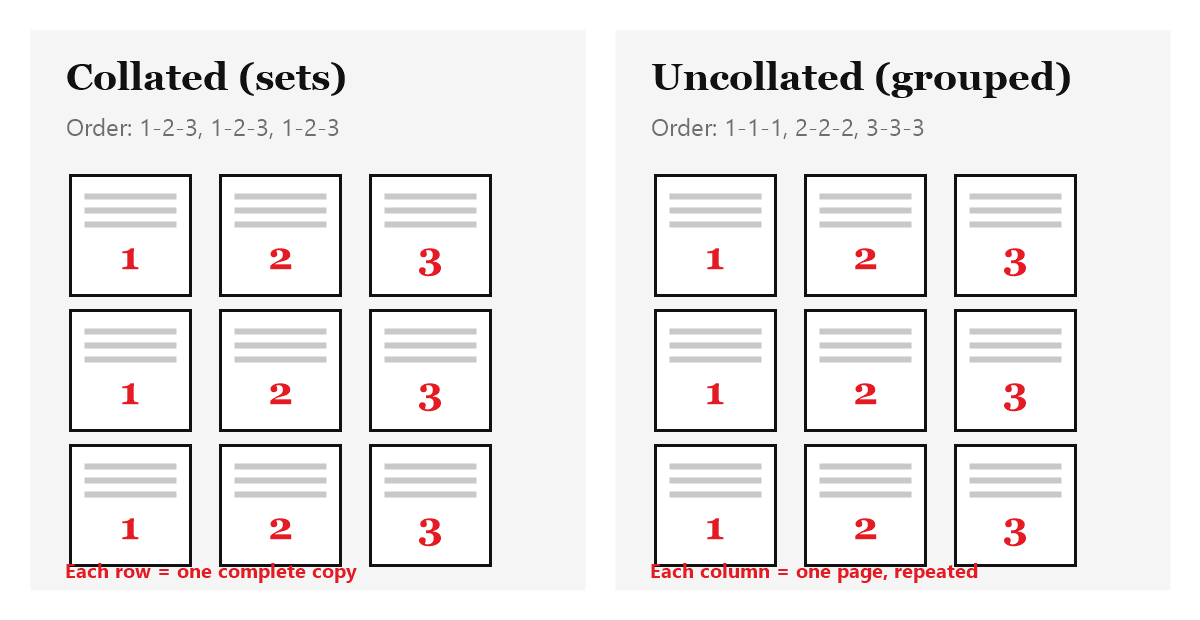
The collated printing process refers to the printing of lengthy documents like novels, notebooks, and assignments. It collates pages and arranges them into a complete set of copy 1 and copy 2 instead of printing page 1, 1 and page 2, 2.
Uncollated printing, or group printing, is the opposite of collated printing. It is suitable only for short-page documents. Mostly, in print settings, collate is set by default before starting uncollated printing; deselect it in the settings. And it will print like page 1, 1 and page 2, 2.
This type of printing is mostly used for business cards, menus, posters and invitation cards. Uncollated copies provide flexibility for various printing businesses.
Function Of A Collating Machine
A collating machine plays a vital role in printing bulk documents, such as in commercial shops and government and educational centers. Collating printing works through two different approaches, which are as follows:
- Manual collation
- Automated collation
Manual Collation
In manual collation, pages are arranged one by one by hand and this process is also known as the traditional method of printing documents. It is a time-taking process, but it gives the same results as automated collation.
Automated Collation
Automated collation uses software programs in which pages are arranged automatically by the printing machine. It is faster than the manual process and avoids human error and other mistakes. You can also get our custom collated printing services through automated collation.
Does Collate Mean Double Sided?
What does collated mean? Collated means printing multiple pages in sequence as a complete set. Collating can print both single and double sides of the sheet.
But people also ask about double-sided collate sheets meaning. Double-sided (duplex) printing is a separate setting from collation. When you turn on both, the printer prints on both sides of each sheet and still keeps every set in page order, so page 2 sits on the back of page 1.
Cost Of Collated Vs Uncollated Printing Services
Collated and uncollated printing both have the same charges. Because both printing techniques use the same quantity of ink and paper. That’s why there is no big difference between collated and uncollated printing prices.
Their prices depend on your printed documents; long documents will charge higher prices and short documents will charge lower prices. It could be the best choice for small business owners due to their limited resources.
What To Choose Between Collating Vs Uncollating Printing?
Collating vs uncollating: both are different printing techniques; there is no quality-wise difference between them. It depends on whether you want to print organized documents in bulk; you have to choose collated printing.
On the other hand, if you want single-page documents like business cards and pamphlets, uncollated printing will be the best choice for you. You can also get our custom printed stationery, which provides quality printing for your brand.
Conclusion
Now you know what collate means when printing and how it works, whether you are printing long or short documents. Collation reduces the risk of errors. This guide helps you decide what you need for a successful business run.
If you need help with custom printing services, our manufacturers provide multi-page document printing services accurately and efficiently. You can take advantage of this opportunity to ensure your printing performance and get budget-friendly options by choosing the best option for your work.
FAQs
Is Collated Printing Double-Sided?
Not always. Collation controls the page order, and double-sided printing is a separate setting. You can turn on both to get complete sets printed on both sides.
What Does Collate Mean When Printing Multiple Copies?
Collate means printing several copies and assembling the page number orders. The printer copies sheets from page 1 to the end instead of printing the same copies of each page.
What Does Collate Mean When Printing?
In the printing process, collate means printing multiple copies as complete sets in page order. A collating printer or machine arranges the sheets automatically.
Can PDF Files Be Collated Automatically?
Yes, some software allows you to review before starting to print and set the PDF files to be collated automatically.
Describe Collate Vs Not Collate?
You can enable or disable collating from your printer’s settings. When you want to use collate, just turn it on from the settings and if you don’t want to use collate, just turn it off.
Is Collate Vs Not Collate Printing Cost-Effective Or Cost-Intensive?
Collated vs uncollated: both are cost-effective printing techniques. Both require the same charges and are the best option for small business operations.